I've encountered a small hitch brought by a student who is wanting to set (for whatever reason) a current value to a scrollbar.
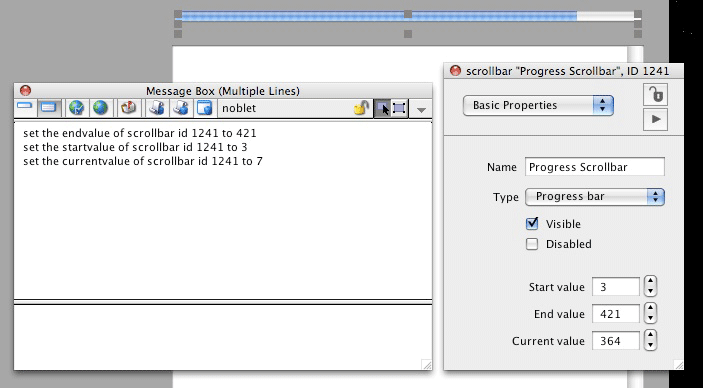
The 'set startvalue' and 'set endvalue' work as expected, but the 'set currentvalue' seems to go through the motions (ie, it does not return an error) but does not in fact alter the current value (in both Studio 3.5 and 4.0).
jmd wrote:I've encountered a small hitch brought by a student who is wanting to set (for whatever reason) a current value to a scrollbar.
The 'set startvalue' and 'set endvalue' work as expected, but the 'set currentvalue' seems to go through the motions (ie, it does not return an error) but does not in fact alter the current value (in both Studio 3.5 and 4.0).
Is there something I'm overlooking???
Actually, the correct command would be set the thumbPos of scrollbar "my Loading Bar" to theValue
And the reason it won't have caused an error is because you can set a custom property on pretty much any object, so if you examined the custom properties of the scrollbar you would find that it's being set perfectly happily (the currentvalue custom property, that is).
I would have thought, however, that in this context currentvalue is not considered a custom property, but rather taken as referring to the property name as given by the inspector.
Personally, I'd like to suggest that either "Current value" be changed to "Thumb pos" in the inspector or that currentvalue be added as a recognised property of a scrollbar (given that this property is so named in the inspector).
It's not as obvious as all that! Don't worry about it. If you like having the "user friendly" description labels but still want to be able to tell what the property name in question is, alternatively you can also mouse hover over the property and the tooltip will show the property name for you.


 Thanks for that - seems so obvious once pointed out!