Page 4 of 5
Re: Assigning a keyboard shortcut to a button
Posted: Thu Feb 10, 2022 10:27 am
by glenn9
jmburnod wrote: Thu Mar 29, 2018 6:42 pm
Hi,
I think you have to use keysdown function
The keysDown function returns a list of keycodes of pressed keys, separated by commas if more than one key is being pressed.
Something like that:
Code: Select all
on mousedown
   if the optionkey is down and the keysdown = 101,0 then
      answer  "optionkey is down and you press e" -- e = 101
   else
      "nothing happened"
   end if
end mousedown
You may get the keycode of a touch with this on card script
Code: Select all
on rawkeydown pKey
   put pKey
end rawkeydown
Best regards
Jean-Marc
Dear All,
I'm trying to implement a keyboard shortcut based on Jean-Marc's code above but I can't seem to be able to get it to work for me using the following code:
Code: Select all
on rawkeydown
   -- I'm wanting an 'Alt S' shortcut
   if the altkey is down and the keysdown is 115,0 then
      answer  "its worked"
   else
      pass rawkeydown
   end if
end rawkeydown
Not sure where I'm going wrong!
Grateful for any tips.
Thanks,
Glenn
PS - apologies, I've just realised I'm probably causing confusion - I'm not wanting to assign a shortcut to a button (as the post title states!), but I'm wanting to have a general shortcut for a field, for example entering Alt S would trigger a 'save' function.
Re: Assigning a keyboard shortcut to a button
Posted: Thu Feb 10, 2022 11:04 am
by SWEdeAndy
glenn9 wrote: Thu Feb 10, 2022 10:27 am
Code: Select all
if the altkey is down and the keysdown is 115,0 then
...is where it goes wrong. At least on my Mac keysDown is not 115,0 when pressing alt + s, it's 115,65513.
If I change the line to
Code: Select all
if the altKey is down and item 1 of the keysDown is 115 then
it works for me, the answer dialog pops up.
Re: Assigning a keyboard shortcut to a button
Posted: Thu Feb 10, 2022 11:09 am
by richmond62
This does
NOT work:
Code: Select all
on keyDown XXX
   if the altKey is down then
      if 115 is in the keysDown then  -- s
            put "Whacko"
      end if
      end if
end keyDown
This
DOES work:
Code: Select all
on keyDown XXX
      if 115 is in the keysDown then  -- s
            put "Whacko"
      end if
end keyDown
Obviously the
altKey blocks
keysDown.
Re: Assigning a keyboard shortcut to a button
Posted: Thu Feb 10, 2022 11:18 am
by SWEdeAndy
richmond62 wrote: Thu Feb 10, 2022 11:09 am
Obviously the
altKey blocks
keysDown.
When used in a keyDown handler, yes. It works fine in a rawKeyDown handler, though. Good to know!
Re: Assigning a keyboard shortcut to a button
Posted: Thu Feb 10, 2022 12:33 pm
by glenn9
Andreas, Richmond,
Many thanks for the suggestions.
I think I've found the problem (but not the solution yet....)
the problem seems to be Windows..., in that livecode's 'altKey' seems to translate to the 'Alt Gr' key on my keyboard, so the below script now works as expected if I press the 'Alt Gr' key but not with the 'Alt' key!
Code: Select all
on rawkeyDown XXX
   if the altkey is down and 115 is in the keysDown then
      answer "Whacko"
   else
      pass rawkeydown
   end if
end rawkeyDown
Wondering if this is a bug, or if I need to use a different LC command for the 'Alt' key??....
Regards,
Glenn
Re: Assigning a keyboard shortcut to a button
Posted: Thu Feb 10, 2022 2:32 pm
by richmond62
Use this stack:
-
-
The top field gives you the
keyDown code, and
the bottom field gives you the
rawKey code.
[This will not work on MacOS]
1. Press the 'Alt Gr' key and see what pops up in the bottom field.
2. Press the 'Alt' key and, probably you'll get a different number.
Re: Assigning a keyboard shortcut to a button
Posted: Thu Feb 10, 2022 5:20 pm
by glenn9
Thanks Richmond,
have downloaded the stack and can see the differing results with the Alt/Alt Gr keys.
Not sure how I can implement this for solving my lack of Alt key functionality though - I'm in the process of trying to pin down whether its a keyboard or PC setting issue that is causing LC to respond to the altKey command with an 'Alt Gr'!
A workaround would be for me to cut my losses and assign keyboard shortcuts that are in easy reach of the Alt Gr key but the letter characters make much more sense for my project to be near the Alt key for ease of use. (I'm usually using my right hand to scroll with the mouse and I'd like to use my left hand to use keyboard shortcuts around the Alt key!).
I did come across this link from Ferrus logic which might have the answer
https://ferruslogic.com/product/libFastShortcuts if only I could understand how to implement it! I'm struggling to understand 'where to put what' re the library placement and my stack - I guess its beyond my LC competency at the moment!
Thank you for trying to help, its very much appreciated.
Regards,
Glenn
Re: Assigning a keyboard shortcut to a button
Posted: Thu Feb 10, 2022 6:00 pm
by richmond62
I wonder if
altKey links with the
Alt Gr key, and
optKey with the
Alt key in Windows?
Ooooer:
-

- SShot 2022-02-10 at 18.59.52.png (11.43 KiB) Viewed 13386 times
-
Should I trust Wikipedia?

I would assume that as LiveCode is descended from a Macintosh-only thing (HyperCard)
it has never crossed anyone's mind to introduce an
altGrKey function into LiveCode.
This is a crusty chestnut:
https://use-livecode.runrev.narkive.com ... d-sideways
Re: Assigning a keyboard shortcut to a button
Posted: Thu Feb 10, 2022 6:05 pm
by richmond62
To be honest, I'd use my little stack I uploaded to get the rawKey code
for the ALT key (NOT the 'ALT GR' key) and then write some thing like this:
PseudoCode:
on rawKeyDown RAWK
if RAWK = ( the magic number returned by Richmond's stack ) then
the rest of your code with the keysDown bit goes here
end
end rawKeyDown
Re: Assigning a keyboard shortcut to a button
Posted: Thu Feb 10, 2022 10:25 pm
by glenn9
Thanks Richmond,
I think I now understand the code for generating keyboard combination shortcuts but I can't seem to get round that the left Alt key does not respond to the LC command 'altKey' - I think this is perhaps an issue with my setup of Windows, or Windows in general?
As a workaround I've now mapped my shortcuts to the Ctrl key which works just fine for both left and right Ctrl keys, and I've tried to take care that the shortcuts don't interfere with the system Ctrl shortcuts!
Thank you again for your help
Regards,
Glenn
Re: Assigning a keyboard shortcut to a button
Posted: Fri Feb 11, 2022 7:25 pm
by jacque
I think the problem is in the handler. It checks for 115 but if that's not the case then it passes the message and does nothing. Now that you know the two different keycodes you can handle them both.
Code: Select all
on rawkeyDown XXX
   if the altkey is down then
     if 115 is in the keysDown then
       answer "altGr"
     else if <other number> is in the keysDown then
       answer "alt"
     end if
   else
      pass rawkeydown
   end if
end rawkeyDown
There's a shorter way to code it if you want both keys to do the same thing, I can show you when I'm not typing on a mobile device if you haven't figured it out by then.
Edit: this isn't correct, see next message.
Re: Assigning a keyboard shortcut to a button
Posted: Fri Feb 11, 2022 11:03 pm
by jacque
Now that I'm at the computer I see the problem. Here's a revised script that should account for either one of the alt keys.
Code: Select all
on rawkeyDown pKey
  put (65513 is in the keysdown or 65514 is in the keysdown) into tAltKeyTrue
  if tAltKeyTrue and pKey = 115 then
    answer "alt"
  else
    pass rawkeydown
  end if
end rawkeyDown
Re: Assigning a keyboard shortcut to a button
Posted: Sat Feb 12, 2022 9:48 am
by richmond62
Of course the problem about not being able to trap rawKeyUp and Down on MacOS is a pain-in-the-bum
if one is trying to write a cross-platform thing that uses the ALT keys.
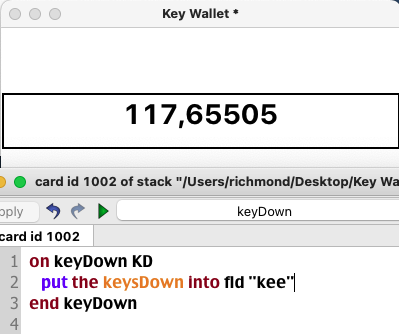
ODDLY ENOUGH, if the
SHIFT key is pressed with another key on a Macintosh system, the
rawKeyCode is
reported for the
SHIFT key:
-
- SShot 2022-02-12 at 10.55.21.png (30.97 KiB) Viewed 13140 times
-
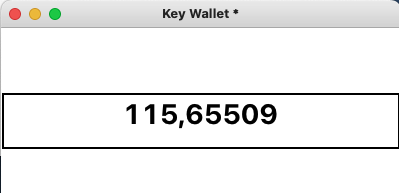
As is the
CapsLock key:
-
- SShot 2022-02-12 at 10.57.20.png (9.54 KiB) Viewed 13140 times
-
the
BACK delete and the
FORWARD delete keys.
Re: Assigning a keyboard shortcut to a button
Posted: Sat Feb 12, 2022 10:16 am
by richmond62
Documentation is a bit "thin".

Re: Assigning a keyboard shortcut to a button
Posted: Sat Feb 12, 2022 4:17 pm
by richmond62
-
Why are these codes NOT Unicode values?
Is there a way for LiveCode to access them?
https://developer.apple.com/library/arc ... ntials.pdf