Page 3 of 3
Re: Force the script editor to update?
Posted: Fri Apr 26, 2024 6:37 pm
by Zax
I think I found a clue: if the main stack to be closed has its cantDelete property set to true, the delete stack command gets stuck.
Is this a bug due to the double meaning of delete stack?
Re: Force the script editor to update?
Posted: Sat Apr 27, 2024 8:11 am
by Zax
After several tests, the following script to close and remove a target stack from memory seems to work.
It has to be called from another stack (otherwise, use the File menu article
Close and Remove from Memory).
The
delete stack command works very cleanly: the main stack and its substacks are closed, removed from the Message Path if necessary, and Script Editor and Project Browser are updated.
Code: Select all
on stackCloseAndRemove pStackShortName, pSilentFailBoolean // short name of the stack to close
   // the stack to close will not be saved
   if (pStackShortName <> the short name of this stack) then // can't be called from the stack to close
      if (there is a stack pStackShortName) then
         try
            if (the mainStack of stack pStackShortName = pStackShortName) then
               set the cantDelete of stack pStackShortName to false
               delete stack pStackShortName
            else close stack pStackShortName // it's a substack: do not "delete" !
         catch errMsg
            if (not pSilentFailBoolean) then
               answer error "Unable to close and remove from memory stack '" & pStackShortName & "':" & cr & cr & \
                     errMsg with "Cancel" or "Close"
               if (it = "Close") then close stack pStackShortName // simple close
            end if
         end try
      else answer error "There is no stack '" & pStackShortName & "'." with "Cancel"
   else close me // simple close if this command is called from the stack to close
end stackCloseAndRemove
Re: Force the script editor to update?
Posted: Sat Apr 27, 2024 9:10 am
by richmond62
Maybe you could make a stack that loads with LC as a palette that has a scrolling list of all open stacks and a button to delete a selected stack.
Re: Force the script editor to update?
Posted: Sat Apr 27, 2024 11:22 am
by Zax
richmond62 wrote: Sat Apr 27, 2024 9:10 am
Maybe you could make a stack that loads with LC as a palette that has a scrolling list of all open stacks and a button to delete a selected stack.
Yes, I have that. It is precisely for my development palette that I needed this kind of script.
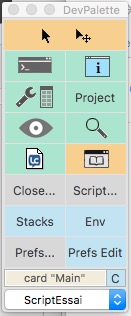
- pal.jpg (25.11 KiB) Viewed 8105 times
Re: Force the script editor to update?
Posted: Sat Apr 27, 2024 5:40 pm
by jacque
Zax wrote: Fri Apr 26, 2024 6:37 pm
I think I found a clue: if the main stack to be closed has its
cantDelete property set to true, the
delete stack command gets stuck.
Is this a bug due to the double meaning of
delete stack?
Good catch, that would be it. The cantDelete property comes from HyperCard and has been around for decades. It isn't a bug, and technically the other instances of delete aren't either. It was mainly intended to be used for controls to avoid accidentally deleting them, and since HC automatically saved the stack after every card change it was necessary to avoid losing things permanently without warning. Now that we have manual saves it isn't as necessary. I can't remember ever needing to use it on stacks though. Is there a reason you need it?
Re: Force the script editor to update?
Posted: Sun Apr 28, 2024 8:47 am
by Zax
Thank you Jacqueline for these explanations.
jacque wrote: Sat Apr 27, 2024 5:40 pm
Is there a reason you need it?
I suppose not. Normally, the cantDelete of my stacks is false but when a stack has a variable number of cards and the user can easily delete cards, I feared that the user would delete all the cards and therefore delete the stack - this is an old habit of HC user!

I have just done a test: a stack script is able to delete all its cards and we end up with a stack without a card - which was nonsense for HC.
In any case, everything works fine now.