Page 3 of 4
Re: My 6-button mouse
Posted: Sat Feb 22, 2020 10:45 pm
by richmond62
No: I'm sorry, that picture was from my hitting 2 keyboard keys to check my code.
Re: My 6-button mouse
Posted: Sat Feb 22, 2020 10:57 pm
by richmond62
Interestingly:
-
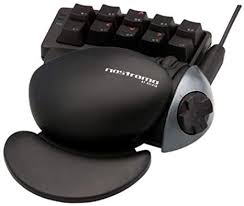
- N50.jpg (5.53 KiB) Viewed 8813 times
-
My
Belkin Nostromo n50 isn't acknowledged by
LiveCode.
-
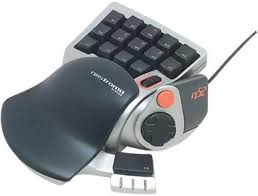
- N52.jpg (5.8 KiB) Viewed 8813 times
-
My
Belkin Nostromo n52 IS acknowledged by
LiveCode.
-
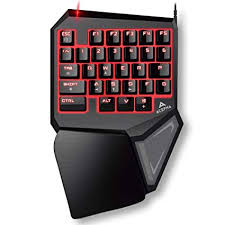
- T9.jpg (8.62 KiB) Viewed 8813 times
-
and my
T9 Pro IS acknowledged by
LiveCode.
None of these have drivers for MacOS 10.15
Re: My 6-button mouse
Posted: Sat Feb 22, 2020 10:58 pm
by richmond62
This is a potential problem for developers working with LiveCode; especially for anyone working on a game,
as they have no idea what sort of mouse and/or other USB peripheral an end-user might have plugged into their machine
with or without drivers.
Re: My 6-button mouse
Posted: Sun Feb 23, 2020 12:06 am
by FourthWorld
What does the Belkin Nostromo n50 do in other applications?
Re: My 6-button mouse
Posted: Sun Feb 23, 2020 9:21 am
by richmond62
FourthWorld wrote: Sun Feb 23, 2020 12:06 am
What does the Belkin Nostromo n50 do in other applications?
Nothing.
-
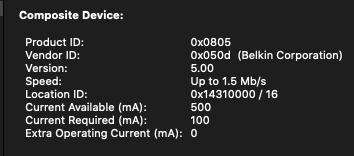
- Screenshot 2020-02-23 at 10.21.04.png (18.76 KiB) Viewed 8780 times
Re: My 6-button mouse
Posted: Sun Feb 23, 2020 9:39 am
by FourthWorld
richmond62 wrote: Sun Feb 23, 2020 9:21 am
FourthWorld wrote: Sun Feb 23, 2020 12:06 am
What does the Belkin Nostromo n50 do in other applications?
Nothing.
How do they advertise attractively with that proposition?
Re: My 6-button mouse
Posted: Sun Feb 23, 2020 9:44 am
by richmond62
The Belkin Nostromo n50 is about 15 years old.
It came with drivers both for PPC and Intel Mac.
The drivers for Intel Mac do work with MacOS 10.7 . . .
What does interest me is that when I connect it to my Mac Mini
the 3 indicator lamps light up, indicating that there is some current running
back and forth.
Connected to one of my G5 PPC Macs (MacOS 10.4.11) one cannot
use the n50 as a partial keyboard; it ONLY works via the macros set up
through the System Preferences pane that comes with the thing.
-
-
BUT the Belkin Nostromo n52 behaves exactly the same when
connected to the PPC Mac.
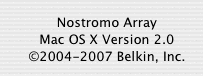
Here's a little something to "extend the joke":
-
- Narray.png (5.02 KiB) Viewed 8756 times
Re: My 6-button mouse
Posted: Sun Feb 23, 2020 7:25 pm
by FourthWorld
richmond62 wrote: Sun Feb 23, 2020 9:44 am
The Belkin Nostromo n50 is about 15 years old.
It came with drivers both for PPC and Intel Mac.
The drivers for Intel Mac do work with MacOS 10.7 . . .
Given the device age, that the manufacturer has chosen not to continue supporting it, and that the other input devices you have are described as working well, it would seem the "potential problem for developers working with LiveCode" is sufficiently limited that few will find it cause for insomnia. Indeed, this intersection of requirements may be an audience of one.

Re: My 6-button mouse
Posted: Sun Feb 23, 2020 7:59 pm
by richmond62
this intersection of requirements may be an audience of one.
This intersection of requirements has an audience of
none.
The n50 Belkin Nostromo gets used most of the time attached to my Xubuntu laptop where I can get it to work
rather well.
I only used the example of the n50 Belkin Nostromo as illustrative of how one really
has no idea when one plugs a USB peripheral into a computer whether it will be
of any value.
My OP, lest you forget, was about mice with more than 3 buttons.

Re: My 6-button mouse
Posted: Sun Feb 23, 2020 8:38 pm
by FourthWorld
richmond62 wrote: Sun Feb 23, 2020 7:59 pm
My OP, lest you forget, was about mice with more than 3 buttons.
Understood, but as noted earlier most input devices work either of two ways: functionality beyond three buttons is mapped to key commands, or a driver is provided to map anything to anything per whatever software the vendor provides.
So in most cases, rawKeyDown or sometimes keyDown() will suffice. With more exotic hardware requiring custom drivers, the ability of any third-party software to work with it will be determined by the capabilities of the driver provided.
Re: My 6-button mouse
Posted: Mon Feb 24, 2020 4:08 am
by mwieder
Given the age of the hardware and especially software, I'd guess that the mac drivers were written to support Carbon, which was created by Apple to ease the migration from MacOS 8 to OS 9. Apple has now completely dropped Carbon in favor of Cocoa. And that is as in "completely dropped", as applications written in Carbon will no longer run on modern OSX systems. The LiveCode engine itself had to be rewritten against Cocoa in order to support the Macintosh. So I wouldn't think that old hardware that requires special drivers would have much of a chance of being compatible with current operating systems.
Re: My 6-button mouse
Posted: Mon Feb 24, 2020 7:42 am
by richmond62
What is the difference between the signal that is sent when I press button X on a USB device
that does not require a driver and on a device that does?
Re: My 6-button mouse
Posted: Mon Feb 24, 2020 7:54 am
by FourthWorld
richmond62 wrote: Mon Feb 24, 2020 7:42 am
What is the difference between the signal that is sent when I press button X on a USB device
that does not require a driver and on a device that does?
most input devices work either of two ways: functionality beyond three buttons is mapped to key commands, or a driver is provided to map anything to anything per whatever software the vendor provides.
Re: My 6-button mouse
Posted: Mon Feb 24, 2020 8:48 am
by richmond62
Presumably the reason buttons 4 and 5 work inwith web-browsers
is that they contain code to leverage those buttons.
Re: My 6-button mouse
Posted: Mon Feb 24, 2020 9:12 am
by FourthWorld
richmond62 wrote: Mon Feb 24, 2020 8:48 am
Presumably the reason buttons 4 and 5 work inwith web-browsers
is that they contain code to leverage those buttons.
If you can describe what those buttons do, I'll be you'll find there's a common keyboard command for that action.