Page 3 of 3
Re: Batch file with a flag -- need assistance
Posted: Wed Apr 17, 2019 6:04 am
by shawnblc
SparkOut wrote: Tue Apr 16, 2019 10:07 am
Ok.
Try
Code: Select all
put "cmd /k" && tFile into tFile
get shell (tFile)
put it
Or add "cmd /k" as the last line of your batch file
@SparkOut I'll give it shot and update here.
FourthWorld wrote: Tue Apr 16, 2019 2:36 pm
Good tip, SparkOut.
What is the advantage to the user in displaying the output in the console window?
@FourthWorld I'd say there is no real advantage. I'm not sure how to display the output and answer the bat file questions and keep it all contained in LC.

Re: Batch file with a flag -- need assistance
Posted: Wed Apr 17, 2019 6:09 am
by FourthWorld
What would normally go to the console should be delivered to you as the return value from the shell function.
Re: Batch file with a flag -- need assistance
Posted: Wed Apr 17, 2019 10:08 am
by shawnblc
Still no luck.
Could it be that the file is in use (or memory) and I'm not getting that error.
Re: Batch file with a flag -- need assistance
Posted: Wed Apr 17, 2019 4:13 pm
by bogs
I'm not sure why you wouldn't receive any input, I set up this simple test of my answer to your post with a batch file I wrote, if you don't use a flag, you get the standard "hello", and if you do use a flag you get an echo of the flag.
This is on a Win7 machine -
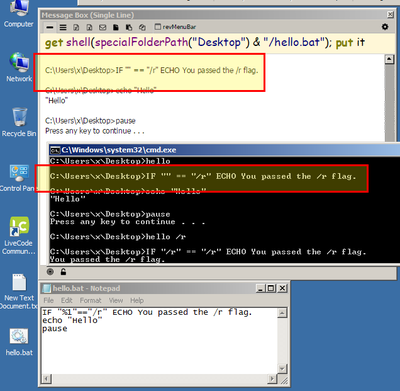
- No flag...
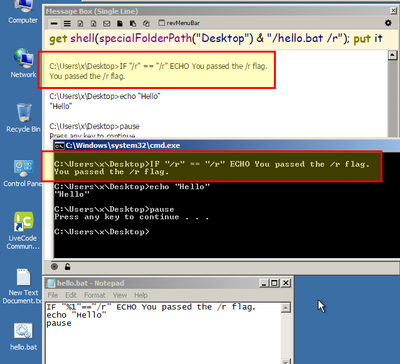
- With flag...
Open your message box, and run your batch file the same way, with the flag your shooting for, then put a screen shot of it if your still not seeing the result you expect so we can see what is happening.
*Edit - I had forgotten about what Thunder pointed out -
in your tron.bat file :
:: Requirements: Run from the current users desktop. Run as Administrator.
I'm not sure that Win runs it as an admin just because your running the exe calling it as an admin. It has been too long since I used Windows for me to remember either, but I'm pretty sure you'd have to call the bat with admin credentials, not just from the sign in.