Page 3 of 4
Re: LiveCode 8.0.0 Property Palette
Posted: Mon Apr 04, 2016 7:57 pm
by jacque
richmond62 wrote:I have just spent 30 minutes "digging" to try and locate the icons in the Props Palette,
even if nothing else you should be congratulated on having hidden them very effectively indeed.
I believe that's because they're a font rather than images, which is what allows them to scale so nicely. But fonts don't allow multi-colored characters in text.
Re: LiveCode 8.0.0 Property Palette
Posted: Mon Apr 04, 2016 7:58 pm
by FourthWorld
mwieder wrote:I'd be very interested to hear suggestions on how the PI should respond when resized
Well, IMO I'd rather the PI didn't resize or relocate at all. That's bothered me since the Runrev 1.0 days. How about allowing it to be user-resizable, and setting the default size to the minimum necessary for all the controls to be visible?
jacque wrote:Here's my take on resizing the palette: It shouldn't do that on its own, it should respect the user's preference.
If there's a vote count mine here with these too.
Re: LiveCode 8.0.0 Property Palette
Posted: Mon Apr 04, 2016 8:05 pm
by richmond62
jacque wrote: I believe that's because they're a font rather than images, which is what allows them to scale so nicely. But fonts don't allow multi-colored characters in text.
At which point I can merrily chime in with either "
SVG" or "
Vector graphics".
It would also be perfectly possible to colorize the font displays just as one colorizes text in a textField.
Anyway, I'm not sure if I believe that:
In fact, if one wants, one can play "silly buggers" with things like this:
which makes me wonder if there aren't some "navIcons" and some 'actionIcons' lurking somewhere.
AS the "header background" is a widget it may, already, reference vector graphic "icons".
Re: LiveCode 8.0.0 Property Palette
Posted: Mon Apr 04, 2016 9:43 pm
by richmond62
What is odd about the SVG widget is that is has 2 colours that can be set: the "normal" and the "highlight".
Now that's OK; BUT I have no idea how one would set those programmatically, as in, for instance:
set the normalColor of widget "Cheese" to "red"
{Hey, I tried that!]
ALSO: the widget "header_background" does NOT have any colour options
beyond INK
AND there's another 'chestnut': why Blends and Inks have been subsumed under the Colors heading.
Re: LiveCode 8.0.0 Property Palette
Posted: Tue Apr 05, 2016 8:17 am
by livecodeali
Thanks for the replies everyone.
The forced minimum width due to the menu icons was put in as a stop-gap as we don't have time to implement multi-row / scrolling options for the palette header before 8.0. Jacque, I think your suggestion of arrows to scroll it is definitely something we'll look at for 8.1. At the same time I'll have a look at minimizing the PI's self-resizing. I tried just putting all the content in a scrolling group, but that didn't work - I probably just need to persevere.
The icons are indeed SVG. Adding color to the icons is a possibility, but I guess something that would need careful discussion and design.
Where would everyone like to see the header bar size preference documented? Where have you looked for it (Richmond and Mark)? The preference itself should probably be put into a general section of the preferences GUI stack as well as the palette header menus I suppose. It *is* in the guide for the IDE:
Re: LiveCode 8.0.0 Property Palette
Posted: Tue Apr 05, 2016 9:59 am
by livecodeali
richmond62 wrote:What is odd about the SVG widget is that is has 2 colours that can be set: the "normal" and the "highlight".
Now that's OK; BUT I have no idea how one would set those programmatically, as in, for instance:
set the normalColor of widget "Cheese" to "red"
{Hey, I tried that!]
This is the same as it has always been - there is an option to display property inspector labels as the name of the property or the description of what the property represents.
This can also be set in the preferences dropdown of the PI:
Since you have the setting set to description, the property name is available as a tooltip:
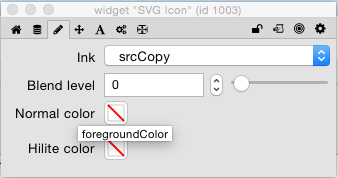
- Screen Shot 2016-04-05 at 09.56.45.png (20.18 KiB) Viewed 10544 times
Re: LiveCode 8.0.0 Property Palette
Posted: Tue Apr 05, 2016 10:14 am
by livecodeali
Re: LiveCode 8.0.0 Property Palette
Posted: Tue Apr 05, 2016 10:31 am
by livecodeali
mwieder wrote:LC8dp16PI.png
Do we really still support metal?
I thought liveResizing had gone by the wayside and now it's just resizable.
Good point

Fixed, also in the above PR.
Re: LiveCode 8.0.0 Property Palette
Posted: Tue Apr 05, 2016 4:05 pm
by mwieder
Ali- Thanks so much for being in this discussion. I realize this should probably be done through bug reports or github issues, but a multiparty brainstorming discussion is much easier here.
This is starting to shape up.
I actually had no idea there was a pulldown menu to adjust some of these things. I filed a bug report (17322) on the fact that there aren't any checkmarks, at least on linux, so it's hard to tell if something is selected, but that's a help.
and another bug report (17321) on an unsubscribe problem with the tools palette (I thought we fixed that).
I can't tell whether or not this is fixed, but when you select Property Labels from the pulldown menu and select either of the two options, the PI still relocates... subjectively the left edge of the pane is centered horizontally on the screen.
Re: LiveCode 8.0.0 Property Palette
Posted: Tue Apr 05, 2016 5:00 pm
by livecodeali
mwieder wrote:
I filed a bug report (17322) on the fact that there aren't any checkmarks, at least on linux, so it's hard to tell if something is selected, but that's a help.
Argh, I believe the same is true on Windows... I hate menus!
mwieder wrote:
and another bug report (17321) on an unsubscribe problem with the tools palette (I thought we fixed that).
Yes, me too - I'll have another look, but hopefully it should be just a case of unsubscribing from idePreferenceChanged.
mwieder wrote:
I can't tell whether or not this is fixed, but when you select Property Labels from the pulldown menu and select either of the two options, the PI still relocates... subjectively the left edge of the pane is centered horizontally on the screen.
That's very strange - can't reproduce that on Mac. The inspector sets a preference every time you move it, so that it can relocate it to the same place. Maybe something up with preferences?
Re: LiveCode 8.0.0 Property Palette
Posted: Tue Apr 05, 2016 5:14 pm
by mwieder
That's very strange - can't reproduce that on Mac.
Yeah - I just tried it on osx and it doesn't relocate.
Re: LiveCode 8.0.0 Property Palette
Posted: Wed Apr 06, 2016 5:22 pm
by richmond62
The icons are indeed SVG. Adding color to the icons is a possibility, but I guess something that would need careful discussion and design.
I'm not sure if it needs "careful discussion or design"
How about just having "Colorize" icons as an option,
with the SVG images having colour overlays of, say, red, green, blue, orange, purple . . .
Re: LiveCode 8.0.0 Property Palette
Posted: Wed Apr 06, 2016 5:31 pm
by richmond62
The icons are indeed SVG.
Aha:
What is this then?
Re: LiveCode 8.0.0 Property Palette
Posted: Wed Apr 06, 2016 5:51 pm
by richmond62
Here's the proof that the Properties palette's icons use a font:
by setting the forgroundColor of the card of the Properties palette to "
red"
all the "icons" go . . . .
RED.
I wonder why someone told me they were
SVG images?
Re: LiveCode 8.0.0 Property Palette
Posted: Wed Apr 06, 2016 7:54 pm
by jacque
richmond62 wrote:The icons are indeed SVG. Adding color to the icons is a possibility, but I guess something that would need careful discussion and design.
I'm not sure if it needs "careful discussion or design"
How about just having "Colorize" icons as an option,]
That looks clownish to me. The icons don't bother me as-is, they are distinctive enough. The icons at the bottom of the Project Browser, on the other hand, are mostly all square and difficult to tell apart without close scrutiny. Those could use a colored line indicating which alignment or adjustment each affects. But since they're a font, that won't happen.