Page 2 of 3
Re: Can't get a border around a button
Posted: Fri Oct 25, 2019 9:25 pm
by MichaelBluejay
Based on above offerings, here's a complete recipe for a nice button:
set the backgroundColor of btn myButton to honeydew
set the style of btn myButton to roundrect
set the borderWidth of btn myButton to 0
Property inspector > Effects:
...> Drop Shadow > Color = #cccccc, Size = 2, Distance = 3, Angle = 4
...> Outer Glow > Color = #009900, Size = 1, Spread = 255
Re: Can't get a border around a button
Posted: Fri Oct 25, 2019 9:28 pm
by Klaus
MichaelBluejay wrote: Fri Oct 25, 2019 9:00 pmklaus, I got the image border to show by setting the showBorder to true. I do see that its color is inherited from the card, but the image's borderColor can also be set directly.
Yep, true, sorry.
This has been this way in the past but obviously fixed some versions ago...
Re: Can't get a border around a button
Posted: Fri Oct 25, 2019 9:30 pm
by bogs
MichaelBluejay wrote: Fri Oct 25, 2019 9:00 pm
bogs, those were interesting ideas in your first stack. They're hard to play around with, because after using the Property Inspector once or twice, the dialog box on the Effects gets scrambled and I have to quit the IDE. The second stack doesn't open.
Huh. I made them in 6.5.2, I'd have thought they would work in any IDE from that to present. Your in what, 9.5? Which OS?
Re: Can't get a border around a button
Posted: Fri Oct 25, 2019 9:50 pm
by MichaelBluejay
The problem might be the file format. What is ".7z"? Maybe it's zipped, or you meant to zip it. I tried changing the extension to ".zip" and unzipping which didn't work, and tried opening the file with LiveCode which said Not a Stack. FWIW, I'm running LC 9.5 on a Mac.
Re: Can't get a border around a button
Posted: Fri Oct 25, 2019 10:01 pm
by bogs
My apologies, I thought I had used 'zip' for both. .7z is the
7-zip format. I'm on 'nix, where it is wildly popular, but although they have Win version there is, alas, no Mac version that I saw in the download section. I'll go back to the previous post and upload the regular 'zip' version.
I was more curious about the part of the quote where you said:
after using the Property Inspector once or twice, the dialog box on the Effects gets scrambled
Unfortunately, I wasn't able to reproduce that on this box, nor a Win box, so I'm not sure what would cause it. I can't run 9.5 on this box reliably, so even if I did see something I would never be sure what the issue was heh.
Re: Can't get a border around a button
Posted: Fri Oct 25, 2019 10:28 pm
by bogs
MichaelBluejay wrote: Fri Oct 25, 2019 9:25 pm
Based on above offerings, here's a complete recipe for a nice button:
set the backgroundColor of btn myButton to honeydew
set the style of btn myButton to roundrect
set the borderWidth of btn myButton to 0
Property inspector > Effects:
...> Drop Shadow > Color = #cccccc, Size = 2, Distance = 3, Angle = 4
...> Outer Glow > Color = #009900, Size = 1, Spread = 255
I dunno, I followed that recipe with a regular button, and a graphic in place of a button. To me, the graphic looks and functions better, at least here on 'nix.
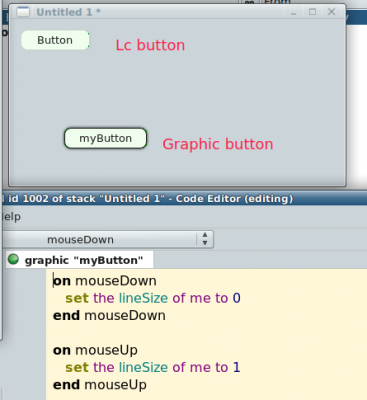
- Button button, whose got the button...
Re: Can't get a border around a button
Posted: Fri Oct 25, 2019 11:01 pm
by MichaelBluejay
Here's how it looks for me on MacOS:

It actually looks a little better. When I do a screenshot with my Retina display, I get twice as many pixels as normal, and then when I reduce the image by 50% so it doesn't look twice as big as normal, I lose quality. I may figure that out someday.
Re: Can't get a border around a button
Posted: Sat Oct 26, 2019 9:08 am
by Klaus
Klaus wrote: Fri Oct 25, 2019 9:28 pm
MichaelBluejay wrote: Fri Oct 25, 2019 9:00 pmklaus, I got the image border to show by setting the showBorder to true. I do see that its color is inherited from the card, but the image's borderColor can also be set directly.
Yep, true, sorry.
This has been this way in the past but obviously fixed some versions ago...
Just tested, this has been this way at least up to version 5.5. where we could not set the bordercolor of an image directly.
Re: Can't get a border around a button
Posted: Sat Oct 26, 2019 2:37 pm
by bogs
Here is what I find a problem with Lc buttons, and why I tend to use a graphic more often (mind you, I don't know if the same is true on Mac).
On Win or 'nix, from Lc 6.x to current, round rect buttons have several glitchy elements to their outline. It has gotten better, but imho, still is nowhere near as good as the graphic roundrect.
Win 7, Lc 9.x, blown up so it can be seen clearly -

...and on 'nix, Lc 6.x...

Everything you do after that, gradients, effects, etc. is all based on the initial outline. If that looks goofy, everything that follows is going to look goofy, or at least, goofier than it should be, which was the reason that first stack of graphic buttons I posted up there came about.
Aside from that, the way the label on the graphic is placed looks better to me too, and I can move it wherever I want it just as with a button.
YMMV, but for me, I'll stick with graphics every time. I haven't (yet) found anything missing between them and a button that wasn't easy to overcome.
Our own R.G. even
submitted this issue last year, so I know I am not alone in having noticed it.
Re: Can't get a border around a button
Posted: Sat Oct 26, 2019 5:27 pm
by jacque
I also use graphics rather than images for custom buttons. Vectors are always cleaner looking.
I asked about image border colors way back in the MC days. I was told it works but only if the color is included in the color palette that's embedded in the image.
Re: Can't get a border around a button
Posted: Sat Oct 26, 2019 5:38 pm
by FourthWorld
Comments #2 and #3 are helpful, suggesting this is a well-encapsulated exercise for a community contributor to tackle while the core team completes other priority tasks for OS changes, crashers, and that sort.
Who among us has some C++ skills and a half-hour to spare?
Re: Can't get a border around a button
Posted: Sat Oct 26, 2019 9:26 pm
by bogs
Heh, I'm about 30 years away from those skills now

Re: Can't get a border around a button
Posted: Sun Nov 03, 2019 12:20 pm
by bn
MichaelBluejay wrote: Fri Oct 25, 2019 8:03 pm
(6) Try to resurrect the border again: "set the outerglow["color"] of graphic myGraphic to silver" >> Error: "Can't set object property."
Give up.
LC is a really weird mixture of super easy and ridiculously difficult.
Michael,
you have to set the color or any other property of outerglow by filling an array and then set "outerglow" to that array
Code: Select all
put "20,20,20" into tArray["color"]
      put "normal" into tArray["blendMode"]
      put "255" into tArray["opacity"]
      put "box1pass" into tArray["filter"]
      put "2" into tArray["size"]
      put "0" into tArray["spread"]
      set the outerglow of btn "myButton" to tArray
kind regards
Bernd
Re: Can't get a border around a button
Posted: Sun Nov 03, 2019 1:29 pm
by bogs
bn wrote: Sun Nov 03, 2019 12:20 pm
you have to set the color or any other property of outerglow by filling an array and then set "outerglow" to that array
Bernd, All of the graphics effects are already arrays, and like any array, you can set any individual key of that array. For example -
Code: Select all
set the outerGlow["color"] of button 1 to "red"
works just as well as putting a whole new array together

Try it from the message box, and you get this -
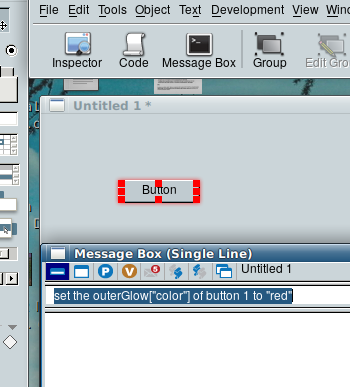
- You make me glow all over!
- ksnip_outerGlow.png (46.83 KiB) Viewed 17074 times
Re: Can't get a border around a button
Posted: Sun Nov 03, 2019 1:51 pm
by bogs
MichaelBluejay wrote: Tue Oct 19, 2010 10:04 am
I drag a popup button out of the toolbox, name it "test", and in the message box I type:
set the borderColor of button "test" to red
But no border appears. I know that the showBorder property has to be true, but the default is already true. (I checked.) I know the menumode also has to be set to "popup menu", but again, that's already the default. (I checked.)
How do I get the border to appear?
I was re-reading this thread from the start, to show the border color, you have to set the threeD of the button to "false". Interestingly enough, although this is in the property inspector for *every single other control* apparently, it is
not in the button basic panel. Go figure.
When the three d border is enabled, you won't see the border color at all, which is probably why Klaus missed it for 10 years

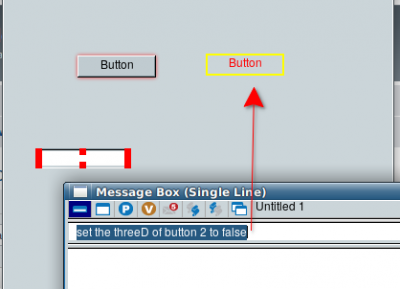
- I'm surrounded !
The top and bottom bevels, as far as I can tell, are broken on buttons. I'll chime back in if I figure that one out.
*Edit - to set the topColor (top of the buttons border), you need to make sure that 'opaque' is false! DOH!!
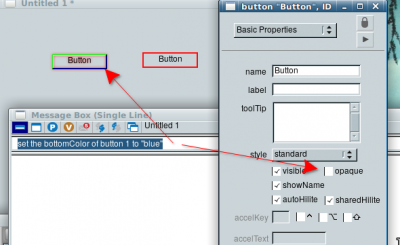
- I'm feeling pretty low...
Edit - Just realized I started off reading posts from 10 years ago!
