Page 2 of 2
Re: Tessellation
Posted: Thu Jan 19, 2023 4:53 pm
by FourthWorld
richmond62 wrote: Thu Jan 19, 2023 3:26 pm
If you click on a vertex while the option key is down you create a new vertex which you can drag to where you want.
Super! Thank you very much.
I wonder if there is a way to fake the Option key being down so that would happen when an end user does a left-click
(i.e. standard mouse-click on a line)?
If memory serves the vertex adding gesture isn't an engine feature, but an IDE script. If you find the script you can add it into your stack with your own message trigger.
Re: Tessellation
Posted: Thu Jan 19, 2023 10:42 pm
by bn
Richmond,
Here is a stack I made long ago which lets you insert a new vertex into a polygon.
You can paste a poligon and make sure it fits into the rectangle of an image.
Then activate "reshape" and click on "add point", the cursor changes and you click close to where you want to insert a new vertex.
It sometimes misplaces the new vertex because of the assumptions I have to make in code. (see script of the button "add Point".
I think it is easier to use the built-in function to add a vertex and drag it to the desired location. If I remember correctly it was not available at that time or I did not find out about it.
Please consider this "abandonware" since the built-in functions work a bit differently but better. Although even the built-in features have trouble at times to decide where to place the new vertex.
In LC there is a revreshapelibrary.livecodescript that contains much of the pertaining code; although there are also calls to revinternal apparently the engine helps a bit.
Kind regards
Bernd
Re: Tessellation
Posted: Fri Jan 20, 2023 11:10 am
by richmond62
Re: Tessellation
Posted: Fri Jan 20, 2023 12:32 pm
by richmond62
-
-
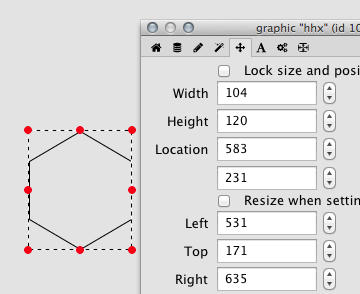
Easier to work with when rotated through 90 degrees:
-
- Screen Shot 2023-01-20 at 1.37.19 pm.png (25.97 KiB) Viewed 6323 times
-
So the distance between the centres of the hexagons is 104 pixels.
Vertical displacement is ((cos (30)) * 104) = 90
Horizontal displacement is ((sin (30)) * 104) = 52
Re: Tessellation
Posted: Fri Jan 20, 2023 12:58 pm
by richmond62
Re: Tessellation
Posted: Fri Jan 20, 2023 1:04 pm
by richmond62
-
All "very groovy", BUT, no good for these purposes as it does NOT constrain the graphics surface area to the size of the original hexagon.
Re: Tessellation
Posted: Fri Jan 20, 2023 1:07 pm
by richmond62
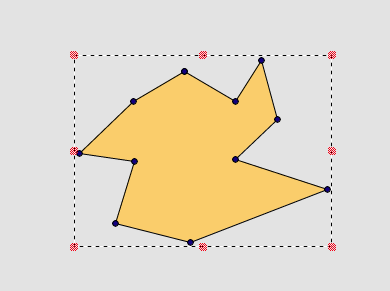
If you click on a vertex while the option key is down you create a new vertex which you can drag to where you want.
1. Having chosen Reshape Graphic, what that did was DUPLICATE the graphic.
2. Without choosing Reshape Graphic, what that did was DUPLICATE the graphic.
So, that's a busted flush unless something changed post LC 8.1.10.
Oh-Oh, wait a minute: I was clicking on a line . . .
-
- Screen Shot 2023-01-20 at 2.52.18 pm.png (12.4 KiB) Viewed 6297 times
-
HOWEVER, the problem of surface area constraint still remains.
-

- coke.jpg (4.63 KiB) Viewed 6292 times
Re: Tessellation
Posted: Sat Jan 21, 2023 1:25 pm
by richmond62
-
That's marvellous, Bernd!
BUT, I am still faced with the surface area constraint problem.