Page 2 of 2
Re: Text Field Rotation
Posted: Fri Jan 06, 2023 11:47 am
by richmond62

- Screen Shot 2023-01-06 at 12.44.36 pm.png (15.87 KiB) Viewed 34062 times
-
Not that I am aware of, unless there is some way to apply something like the GIMP unsharp filter to the resulting
snapshot.
https://docs.gimp.org/2.10/en/gimp-filt ... -mask.html
Re: Text Field Rotation
Posted: Fri Jan 06, 2023 11:55 am
by Klaus
Setting the
metadata["density"] has no effect on the quality of the exported/printed image.
Try to add the "... at size" parameter:
Code: Select all
on mouseup
    lock screen
    local tImage, tMetadata
    set the resizeQuality of the templateImage to "best"
    ## put 2400 into tMetadata["density"]
    create image "rotatedText"

    ## Use 4 times the original dimensions:
    put the width of fld "captionfield" into tWidth
    put the height of fld "captionfield" into tHeight
    put (tWidth * 4) & "," & (the height of fld "captionfield" * 4) into tSize

    export snapshot from field "captionfield" AT SIZE tSize to tImage as png
    ##  export snapshot from field "captionfield" with metadata tMetadata to tImage as png
    set the text of image "rotatedText" to tImage

    ## Resize image
    set the width of img "captionfield" to tWidth
    set the height of img "captionfield" to tHeight
    set the lockloc of img "captionfield" to TRUE

    set the loc of image "rotatedText" to the loc of this card
    set the angle of image "rotatedText" to 45

   ## !!! :-)
   reset the templatimage
   unlock screen
end mouseup
Not tested, but may give better printing results.
Best
Klaus
Re: Text Field Rotation
Posted: Fri Jan 06, 2023 1:11 pm
by richmond62
Let's Go Rockabilly!
-
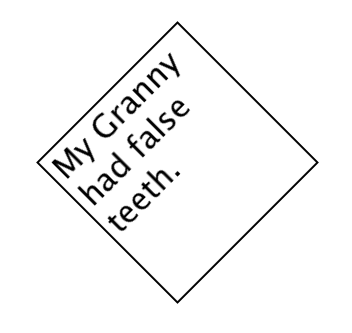
- Screen Shot 2023-01-06 at 2.04.17 pm.png (17.59 KiB) Viewed 34055 times
-
Code: Select all
on mouseUp
   import snapshot from fld "ff"
   set the loc of fld "ff" to -200, -200
   set the name of the last img to "SHOT"
   set the angle of img "SHOT" to 45
   clone img "SHOT"
   set the name of the last img to "SHOT2"
   set the loc of img "SHOT2" to the loc of img "SHOT"
   put the loc of img "SHOT" into WHERE
       delete img "SHOT"
    set the resizeQuality of img "SHOT2" to "best"
   put the width of img "SHOT2" into WIDD
   put the height of img "SHOT2" into HITE
   set the width of img "SHOT2" to (WIDD/4)
   set the height of img "SHOT2" to (HITE/4)
   import snapshot from img "SHOT2"
   set the name of the last img to "SHOT3"
   delete img "SHOT2"
   set the resizeQuality of img "SHOT3" to "best"
   set the width of img "SHOT3" to WIDD
   set the height of img "SHOT3" to HITE
   set the loc of img "SHOT3" to WHERE
    --delete img "SHOT"
   set the name of img "SHOT3" to "SHOT"
end mouseUp
Re: Text Field Rotation
Posted: Fri Jan 06, 2023 1:57 pm
by bn
Klaus wrote: Fri Jan 06, 2023 11:55 am
Setting the
metadata["density"] has no effect on the quality of the exported/printed image.
Try to add the "... at size" parameter:
I tried Klaus' suggestion to set the "at size" parameter at 4 times the original dimensions and that produced the cleanest snapshots for
printing yet at angle 90,180,270,-90 (That was what Jon, the original poster was after)
Code: Select all
on mouseup
   lock screen
   local tImage, tMetadata, tWidth, tHeight, tSize, tQuality

   put "good" into tQuality
   reset the templateImage
   set the resizeQuality of the templateImage to tQuality -- "good" works well for angles 90,180,270,-90 in print
   set the lockloc of the templateImage to TRUE

   if there is an image "rotatedText" then
      delete image "rotatedText"
   end if

   create image "rotatedText"

   # Use 4 times the original dimensions:
   put the width of fld "captionfield" into tWidth
   put the height of fld "captionfield" into tHeight
   put (tWidth * 4) & "," & (the height of fld "captionfield" * 4) into tSize

   export snapshot from field "captionfield" AT SIZE tSize to tImage as png
   set the text of image "rotatedText" to tImage

   ## Resize image
   set the angle of image "rotatedText" to -90
   if the angle of image "rotatedText" is among the items of "90,270,-90" then
      set the width of img "rotatedText" to tHeight
      set the height of img "rotatedText" to tWidth
   else
      set the width of img "rotatedText" to tWidth
      set the height of img "rotatedText" to tHeight
   end if
   set the loc of image "rotatedText" to the loc of this card

   reset the templateimage
   unlock screen
end mouseup
These are screenshots from a pdf (to do what Jon wanted) Upper text is "native" text field.
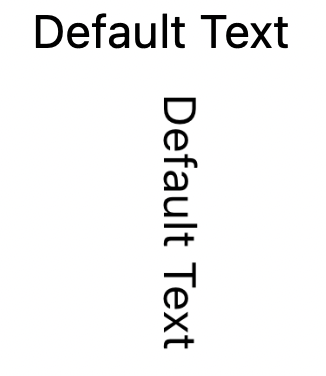
- screenshot from pdf -90.png (55.31 KiB) Viewed 34051 times
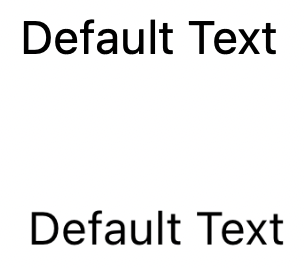
- screenshot from pdf.png (43.44 KiB) Viewed 34051 times
Kind regards
Bernd
Re: Text Field Rotation
Posted: Fri Jan 06, 2023 2:24 pm
by cmhjon
A huge thank you to everyone who have responded but at the risk of seeming ungrateful for everyones help (which couldn't be further from the truth!), can't the engineers at LC just make it possible to rotate a text field control natively in LC or am I asking for the impossible?
Best regards,
Jon
Re: Text Field Rotation
Posted: Fri Jan 06, 2023 2:26 pm
by richmond62
I would suggest you direct that last question to the LiveCode people directly.
Re: Text Field Rotation
Posted: Fri Jan 06, 2023 2:37 pm
by Klaus
Add a comment to this enhancement request from 2004, yes, this one is 19 years old!
https://quality.livecode.com/show_bug.cgi?id=1264
Re: Text Field Rotation
Posted: Fri Jan 06, 2023 4:15 pm
by cmhjon
Done and done

Best regards,
Jon
Re: Text Field Rotation
Posted: Fri Jan 06, 2023 5:43 pm
by FourthWorld
bn wrote: Fri Jan 06, 2023 1:57 pm
I tried Klaus' suggestion to set the "at size" parameter at 4 times the original dimensions and that produced the cleanest snapshots for
printing yet at angle 90,180,270,-90 (That was what Jon, the original poster was after)
A good idea.
https://forums.livecode.com/viewtopic.p ... 03#p220793
Case #427 of why duplicate threads are problematic.
Re: Text Field Rotation
Posted: Fri Jan 06, 2023 6:39 pm
by bn
Here is a version of getting a snapshot at size x*4,y*4 from the formattedRect of char 1 to -1 of the captionField. Also known as the Klaus technique.
The advantage is that it is easier to capture arbitrary text without adjusting the field dimensions to accomodate the text.
I think this is as good as it gets for angles 90,180,270,-90. At resizeQuality "good" native text and the reduced snapshot image are indistinguishable on screen and in print to pdf.
Kind regards
Bernd
Re: Text Field Rotation
Posted: Fri Jan 06, 2023 11:03 pm
by stam
Out of curiosity, given the modern hardware, is there a downside to using resizeQuality "best"? Why use "good"?
Re: Text Field Rotation
Posted: Fri Jan 06, 2023 11:05 pm
by bn
stam wrote: Fri Jan 06, 2023 11:03 pm
Out of curiosity, given the modern hardware, is there a downside to using resizeQuality "best"? Why use "good"?
because "best" antialiases/smoothes to much and the image gets fuzzy.
KInd regards
Bernd
Re: Text Field Rotation
Posted: Sat Jan 07, 2023 11:13 am
by richmond62
"Smoothes too much" . . .
Not with my method.
Disclaimer: I have never been a smoothie.

Re: Text Field Rotation
Posted: Thu Jan 19, 2023 1:32 pm
by bn
I uploaded an improved stack to "Sample Stacks" that allows for any angle of the rotated snapshot.
Either access it from within LC via "Sample Stacks" or via
https://livecodeshare.runrev.com/stack/ ... extField_2
Kind regards
Bernd