Page 2 of 3
Re: Need to make Grids with colors??
Posted: Thu Mar 11, 2021 8:04 pm
by richmond62
Richmond, again, what is your very colorful table comprised of, and how would you set, say, "cell 2,2" to red?
I said it was a mockup, and that is exactly what it was:
a screenshot of a tableField with
cells filled in using GIMP.

Sorry to all you folk who thought I was the new Messiah; I am far more like
the Devil's sidekick.

Re: Need to make Grids with colors??
Posted: Thu Mar 11, 2021 8:14 pm
by bogs
I would just love to know how either the OP or Richmond was able to color individual "cells" in a standard table field.
Pssst - <backgroundColor of the text hee hee>
Re: Need to make Grids with colors??
Posted: Thu Mar 11, 2021 8:15 pm
by dunbarx
When it starts filling up past the bottom rows i need to keep scrolling after each input and its a pain. Need to figure that one out.... want to be able to see at least 3 spaces at bottom at all times....if possible.
Hi.
You can set the scroll of a table field at any time, perhaps trapping the "rawKeyUp" message:
Code: Select all
on rawkeyup
   set the scroll of fld "yourtableField" to someValue --could be "0" or "100000000"
end rawkeyup
This will keep the scroll either at the top or the bottom as you change it.
Craig
Re: Need to make Grids with colors??
Posted: Thu Mar 11, 2021 8:22 pm
by richmond62
backgroundColor of the text
That presupposes that the text in the cells ALWAYS expands to fill the whole cell, and as fonts differ . . .
Err . . . and what about empty cells?
I could use the forbidden word here . . . DATAGRID . . . but don't start looking at me: I played with the first version
of that about 12 years ago, got stuck and gave up, and as to the new, supposedly spiffier incarnation: count me out.
Re: Need to make Grids with colors??
Posted: Thu Mar 11, 2021 10:04 pm
by dunbarx
OK, you guys,
I rarely use images or the like, the darlings of you modern LC people. I should have known it was something like that, because I do not believe a table field can do anything like it.
Anyway, no1g8tor96, this will have to be a roll-your-own gadget. Do you need help with that?
Craig
Re: Need to make Grids with colors??
Posted: Thu Mar 11, 2021 10:11 pm
by bogs
dunbarx wrote: Thu Mar 11, 2021 10:04 pm
Anyway, no1g8tor96, this will have to be a roll-your-own gadget.
Which I suggested waaaayyyyy back near the 2nd post heh. This is child's play if you use 2 fields, color the back one, make the front not opaque.
Re: Need to make Grids with colors??
Posted: Thu Mar 11, 2021 10:29 pm
by dunbarx
This is child's play if you use 2 fields, color the back one, make the front not opaque.
I am terrible at child's play.
How can two fields do? You need a control of some kind behind each "cell", or you cannot control the colors individually.
That is why a dataGrid, which is built of an array of fields, or some home-brewed gadget, is required.
Craig
Re: Need to make Grids with colors??
Posted: Thu Mar 11, 2021 10:46 pm
by bogs
Craig, if you follow the link to the 'little gadget' I created in the earlier part of this thread, you'd have come to
this page in which I demo'd a field used to create a filled grid like pattern. This field would be in the background for the purposes of this discussion.
You would then set the field your actually working in to the foreground, and simply uncheck the 'opaque' which means that you can type and all that in the front field, and set the back field to show the colors. You set the scroll of the back field to that of the front, and they stay in sync so that for all intents and purposes, they 'look' like one field.
The discussion Richmond got going that prompted me to do the last link was from
this topic and parallels this topic pretty well.
dunbarx wrote: Thu Mar 11, 2021 10:29 pm
I am terrible at child's play.
So was Chucky, but I hope that clears some of the fog for you at least from where I am coming from

Re: Need to make Grids with colors??
Posted: Thu Mar 11, 2021 10:50 pm
by richmond62
Oh, Aye, the dataGrid . . .
. . . Personally the dataGrid gives be the dry boak as, while undoubtedly being very clever, it seems
needlessly cumbersome (stole that word from Klaus) and awkward.
Surely it would be a whole lot easier to make up one's own grid of simple fields
named sequentially [erm: a1, a2, a3, a4, b1, b2, b3 and so on] that are then grouped?
-
-
Code: Select all
on mouseUp
   put 1 into FNUM
   repeat until FNUM > 6
      put 1 into SNUM
      repeat until SNUM > 20
      clone fld "fx"
      set the name of last fld to (FNUM & "x" & SNUM)
      set the topLeft of last fld to ((FNUM * 100),(100 + (SNUM * 30)))
      add 1 to SNUM
      end repeat
      add 1 to FNUM
   end repeat
end mouseUp
Re: Need to make Grids with colors??
Posted: Thu Mar 11, 2021 10:59 pm
by richmond62
Of course one could go COMPLETELY BONKERS:
-
-
Code: Select all
on mouseUp
   put 1 into FNUM
   repeat until FNUM > 6
      put 1 into SNUM
      repeat until SNUM > 20
         clone fld "fx"
         set the name of last fld to (FNUM & "x" & SNUM)
         set the topLeft of last fld to ((FNUM * 100),(100 + (SNUM * 30)))
         put random(255) into C1
         put random(255) into C2
         put random(255) into C3
         set the backGroundColor of last field to (C1, C2, C3)
         add 1 to SNUM
      end repeat
      add 1 to FNUM
   end repeat
end mouseUp
Re: Need to make Grids with colors??
Posted: Fri Mar 12, 2021 5:59 am
by no1g8tor96
Richond
Thats perfect...WIll just create 4 individual fields in a "group" with scroll and then Clone them and place them on the next line....or make 80 lines of 4 fields...def one of the two.
if I make 4 fields and want to clone and put them below the current ones how would i do that. Not sure of how to position the fields like you did for the boxes you created.
Thanks again.
Re: Need to make Grids with colors??
Posted: Fri Mar 12, 2021 8:03 am
by richmond62
Not sure of how to position the fields like you did for the boxes you created.
You need to look closely at my code:
Code: Select all
set the topLeft of last fld to ((FNUM * 100),(100 + (SNUM * 30)))
Re: Need to make Grids with colors??
Posted: Fri Mar 12, 2021 9:20 am
by FiNN-6001
Just so I understand, DataGrids are just fields that are one next to each other (and created by code for automation)?
Re: Need to make Grids with colors??
Posted: Fri Mar 12, 2021 9:44 am
by richmond62
Just so I understand, DataGrids are just fields that are one next to each other (and created by code for automation)?
No, they are not, they are something considerably more complicated:
https://livecode.com/docs/9-6-1/compone ... data-grid/
What I have offered here is something that is very, very much simpler, and because of that it
does not have very many of the capabilities of dataGrids.
Re: Need to make Grids with colors??
Posted: Fri Mar 12, 2021 9:46 am
by Thierry
FiNN-6001 wrote: Fri Mar 12, 2021 9:20 am
Just so I understand, DataGrids are just fields that are one next to each other (and created by code for automation)?
Hi Finn,
look at this screenshot:
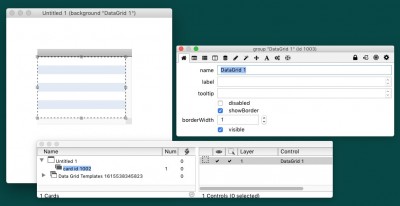
- what a datagrid is...
I've made a new stack, dropped a Datagrid object on the card,
and selected the datagrid to show its PI.
So, you can see that a dataGrid is a group!
Now, select 'Edit group' and you'll see the different objects contained in the datagrid.
Good luck in your discovery... and HTH,
Thierry