Page 2 of 2
Re: Cant open *.livecode
Posted: Thu Nov 14, 2019 7:44 pm
by Klaus
You should also check THE RESULT, maybe this will give you a clue:
Code: Select all
...
answer file "Select your stack file:"
go stack it
##!!
answer the result
...
Re: Cant open *.livecode
Posted: Thu Nov 14, 2019 7:57 pm
by FourthWorld
DavJans wrote: Thu Nov 14, 2019 7:34 pm
FourthWorld:
The backup that works is 30MB
The broken file is 26MB
Makes me feel like as it was saving the last time LC crashed at the end explaining the missing script at the end of the file while viewing in Notepad.
Smart status is OK
Thanks. And glad we can rule out the hardware.
Can you describe what's in the stack file? How many substacks, total number of cards, rough estimate of number of images, etc. And was the size and structure of the previously-crashed stack file similar to the one you're dealing with now?
Also, LC saves using this sequence:
1. Makes a backup copy of the file, named the same as the original stack file but with "~" added to the file name.
2. Then it writes the currently-open stack file data to disk.
3. Performs a checksum on the freshly-written data.
4. If the checksum succeeds, it then deletes the backup copy.
If it crashed while saving, chances are good (unless it crashed specifically after step #4) that there's a complete backup of the last successfully-saved stack file in that directory.
Re: Cant open *.livecode
Posted: Thu Nov 14, 2019 9:28 pm
by bogs
mwieder wrote: Thu Nov 14, 2019 3:43 am
One more thing: lock messages from the IDE or the messagebox, then open the stack from the menubar. See if the stack loads without triggering any messages.
DavJans wrote: Thu Nov 14, 2019 7:34 pm
mwieder:
I don't know how to do that
Simply click on the messages icon in the menu bar before launching the stack...
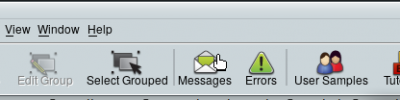
- Locker up!
..so that it looks like this....
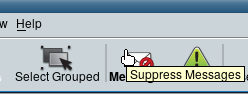
- Done and launch your stack....
- ksnip_lockMessagesLocked.png (7.37 KiB) Viewed 5117 times
Re: Cant open *.livecode
Posted: Thu Nov 14, 2019 10:17 pm
by mwieder
I have had the situation in LC9.x where editing multiple scripts in the Script Editor saves the wrong one, i.e.:
edit three scripts, save one, get the wrong script stored in the wrong object.
Easy to see how this would end up with a corrupted stack, or at least a stack that acts like it's corrupted.
Luckily Dropbox's previous-versions feature let me recover.
Re: Cant open *.livecode
Posted: Thu Nov 14, 2019 11:43 pm
by dunbarx
Mark,
I have had the situation in LC9.x where editing multiple scripts in the Script Editor saves the wrong one, i.e.:
edit three scripts, save one, get the wrong script stored in the wrong object.
Yipes. I have never seen that, but now am worried. Do you use separate tabs or separate windows to edit multiple scripts?
Craig
Re: Cant open *.livecode
Posted: Fri Nov 15, 2019 2:12 am
by mwieder
Just separate tabs. This has only happened to me twice that I know of, and not with the current (9.5.1 9.0.5) builds. And of course no repeatable sequence of events, so I can't point a finger of blame in a particular direction.
Re: Cant open *.livecode
Posted: Wed Nov 27, 2019 9:40 pm
by DavJans
Thank you all for the help, support asked if I had a file that was *.livecode~
I did and apparently whats a backup livecode makes when, I don't know, never seen it before. removed the ~ and it works.
Re: Cant open *.livecode
Posted: Wed Nov 27, 2019 9:44 pm
by FourthWorld
DavJans wrote: Wed Nov 27, 2019 9:40 pm
Thank you all for the help, support asked if I had a file that was *.livecode~
I did and apparently whats a backup livecode makes when, I don't know, never seen it before. removed the ~ and it works.
That seems like
sound guidance.
