pderocco wrote: Fri Sep 21, 2018 11:56 pm
I think I'm being misunderstood. Bogs, you were pasting in a different situation, where there wasn't already an indented line.
I'm sure willing to admit my understanding isn't always that great going in either direction, but I will certainly try again to see if I can get it right to confirm what your finding.
In this picture, I have set up an if then statement with a comment I will be copying. I have indented line 4 with a tab before copying anything. All formatting options are off, per the previous set of pictures.
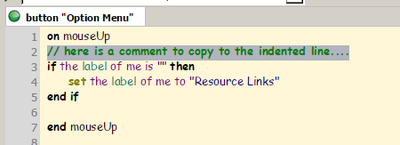
- Setup shot...
The bug is simply this: [1] clicking at the start of a line that already has indented text in it does not place the cursor in column 1, but on the first non-blank character.
As you can see in this screen shot (do you know how hard it is to get a shot of a blinking cursor !?!) I clicked at the left most part of the line, and it put the cursor there.
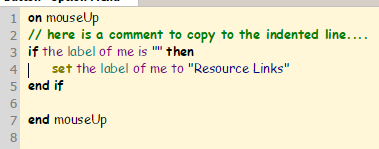
- Cursor placed...
- Selection_008.png (10.82 KiB) Viewed 11555 times
Now, let me add that if I clicked where the tab space was, it does indeed treat it as a block of space, and it will set the cursor to either the right or left depending on where you click on past the middle of that tab block.
I then pasted the copied comment there, and clearly it went to the first character and the tab remains splitting the comment and line that was previously there with the tabbed indent.
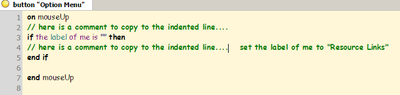
- Pasted line...
It even does this if you move up or down into the line from a non-indented line with the cursor keys. The result is that it is difficult to paste complete lines where they belong.
Since you said you were a keyboard user over mousing, I also tested moving that cursor with the keyboard only. I saw no issue with putting it where I expected it to be.
This has been the situation since I started using LiveCode years ago, so it's obviously intended.
<sic> I suppose it could be justified as part of "auto format", except that it really doesn't have anything to do with formatting.
I spend a lot of time in the earlier versions of Lc and Mc, I have never noticed this behavior there either with all formatting off, but in all honesty, I wasn't ever looking for it either. I certainly will now though

Well, later anyway, when I have some time to spend on it

Let me be clear: I'm not complaining about things like adding whitespace to match the current indentation on hitting Enter. That's a different issue, a reasonable part of auto format. I'm just saying that the inability to put the cursor at the start of an already indented line is a problem.
IF you have all formatting options off, you shouldn't see any of that behavior, and I certainly did not see white-space matching or any other formatting behavior with the options I previously showed off being off, which leads me to think you may be having one of several possibilities going on.
..1. You've obviously been using this for years, perhaps you have a plugin hanging around that is creating this issue?
..2. You missed a formatting setting somehow?
..3. As mentioned earlier, maybe try deleting your prefs? ( and yes, I know its a right pain to go re-set up everything ).
..4. Something I missed? (again? )
What you might try is setting up a small vm like I did and installing win7 and Lc fresh, no plugins, no nothing, and try testing it that way. I just couldn't reproduce your issue, sorry


