Page 2 of 2
Re: Simulate key press
Posted: Sun Mar 13, 2016 5:32 pm
by jacque
dunbarx wrote:Do you think this is worth mentioning? I have always been comforted by believing that an xTalk IDE was so flexible and accessible that, generically, " being able to invoke an arrowKey message under script control" was, simply, doable.
Did I mention that other instances of that pipe dream required kluges?
LC doesn't allow scripts to override its own messages, unlike HC, but that's a different thing. Are there other keywords that can't be "sent"? If so, then it's apparently intentional for some reason. If not, then it might be worth a mention.
Re: Simulate key press
Posted: Tue Jul 19, 2016 6:54 pm
by richmond62
As far as I can see the reason why it doesn't seem possible to invoke an
arrowKey signal via script is
because, unlike a
mouseDown the thing consists of 2 components:
It might (?) be an idea to submit an enhancement request of this sort:
send "arrowKey"("up")
Re: Simulate key press
Posted: Tue Jul 19, 2016 6:57 pm
by richmond62
Come to think of things, a series of this sort would be useful:
send "keyUp"("r")
send "rawKeyUp"(114)
Re: Simulate key press
Posted: Tue Jul 19, 2016 7:10 pm
by jacque
Try the "type" command?
Re: Simulate key press
Posted: Tue Jul 19, 2016 7:25 pm
by richmond62
I tried
type.

- type1.png (6.19 KiB) Viewed 5259 times
and wondered how I would get the buttonScript to type "
Аз харесам кашкавал"
by sending
rawKey codes and having a Bulgarian keyboard layout selected on my computer.
This kind of banal and obvious script:
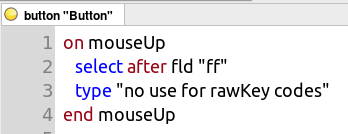
- type2.png (12.5 KiB) Viewed 5259 times
and
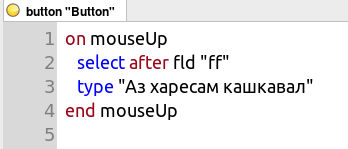
- type3.png (12.69 KiB) Viewed 5259 times
(Having checked that script: it does NOT work)
>>> work (and
kudos to the
Livecode people for everything working in a straightforward way
with a non-Latin writing system). <<<
How do I type the
arrowKey "
down"?
Re: Simulate key press
Posted: Tue Jul 19, 2016 7:34 pm
by richmond62
To explain in a little more detail:
Here's a cardScript:
on arrowKey AX
switch AX
case "up"
--do procedure #1
break
case "down"
--do procedure #2
break
end switch
end arrowKey
Now; how could I have a button which contains this sort of (pseudocode):
on mouseUp
send "arrowkey"("up") to card id 2001
end mouseUp
and, similarly with rawKey values?
Re: Simulate key press
Posted: Tue Jul 19, 2016 8:41 pm
by jacque
I wouldn't think you need to send an arrowkey message at all. Just separate the actions from the handlers:
Code: Select all
on arrowKey AX
  switch AX
    case "up"
     procedure!
      break
    case "down"
     procedure2
      break
  end switch
end arrowKey

on mouseUp
  procedure1
end mouseUp

on procedure1
  -- stuff
end proceudre1

on procedure2
  --stuff
end proceudre2
Or you could combine them:
Code: Select all
on procedure pNum
  switch pNum
    case 1
      -- procedure 1 stuff
      break
    case 2
      -- procedure 2 stuff
      break
  end switch
end proedure