Page 2 of 2
Re: Slot Machine emulation
Posted: Mon Nov 10, 2025 2:19 am
by Hutchboy
Hi,
I wanted to show this effect can easily be expanded to multiple rows (and probably additional columns).
Mike
Re: Slot Machine emulation
Posted: Tue Nov 11, 2025 12:36 am
by Hutchboy
Hi,
I wanted to show the extensibility of my approach to spinning slot machine reels by adding an additional two columns but with images the file size is too large to post here. I tweaked to use fields instead of images. The zip'd file is < 4k.
This opens up some new possibilities to explore because you should be able to change the displayed text in the fields "on the fly".
-Mike
Re: Slot Machine emulation
Posted: Tue Nov 11, 2025 9:46 am
by Klaus
Hi Mike,
I always use buttons with their icon set when I need to display one or more images more than once in my stack(s).
Best
Klaus
Re: Slot Machine emulation
Posted: Tue Nov 11, 2025 10:54 am
by richmond62
Of course you can also use graphic objects with their backGroundPattern set to the image you want to use.
Re: Slot Machine emulation
Posted: Tue Nov 11, 2025 12:43 pm
by Hutchboy
Hi,
Thanks for the tips, I'll try both suggestions and do a comparison on speed and file size. I've used both methods in the past but frankly forgot about the backgroundPattern set to an image.
Thanks,
Mike
Re: Slot Machine emulation
Posted: Tue Nov 11, 2025 8:16 pm
by bn
Hi,
Here is something similar to a slot machine I made many years ago. It uses a game loop for animating three scrolling fields.
It has a lot of eye candy and features.
I had to provide images in 2 zipped folders because of size restrictions. The images are just test images. Put them into 1 folder and then use the stack "ScrollingImages" to import the unified folder. For that use at the top right the checkbox "show/hide loading". First import the images via the upper button "importAndResizeImages", once imported use the lower button "loadThisFieldIntoWheel(s)" to set up the scrolling fields.
You can use your own folder of images to import images. Images are automatically resized to 160 by 120 pixel. The original images are not touched.
Because of the dimensions landscape images are recommended. Also the aspect ratio of 4X3 is recommended to avoid distortion.
Use button "startAutoScrollforAll3" to start the scrolling. You can use the sliders to adjust speed and direction of scrolling.
You can also scroll manually with the mouse or pressing the mouse and initiate a scroll by moving the mouse.
Do not use "accelerated rendering" because it slows down the scroll.
"create image overly" replaces the graphics with a snapshot of the graphics to speed up scrolling. This was more important 12 years ago than today because the overall speed with current computers has increased considerably.
See also help (?).
Kind regards
Bernd
Re: Slot Machine emulation
Posted: Wed Nov 12, 2025 3:57 am
by Hutchboy
Hi,
bn: That is an impressive stack! I tried the group scrolling technique a few years ago working on a slot machine simulator but with only partial success. I am looking forward to studying your stack.
- Mike
Re: Slot Machine emulation
Posted: Wed Nov 12, 2025 9:34 am
by bn
Thanks Mike,
The main trick is to double the number of referenced images in the fields. That way you can simulate a endless scrolling by setting the scroll of the field to show the appropriate image. Also I like the idea of a game loop: all scrollers register with the game loop and the loop triggers the scroll of each registered scroller at the same time which is guarded by a lock screen and saves screen updates. The groups exist only to be able to have many more than one identical scroller at the same time.
The pseudo 3-D effect is accomplished using graphics and the groups are resizable and keep the pseudo 3-D appearance.
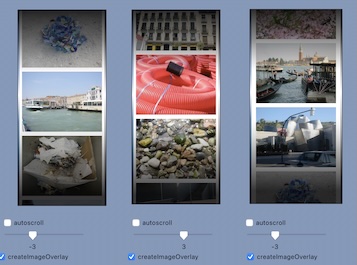
- Scrolling Images.jpg (39.59 KiB) Viewed 14215 times
Kind regards
Bernd